
Your brain's shortcut
to success
Every meeting ends with decisions. Most of them evaporate by Friday. Axgenta turns what your team agrees on into owned, deadlined, tracked work — before the room even empties.
No credit card required · Full access · Cancel anytime
New here? See what Axgenta is — explained simply →
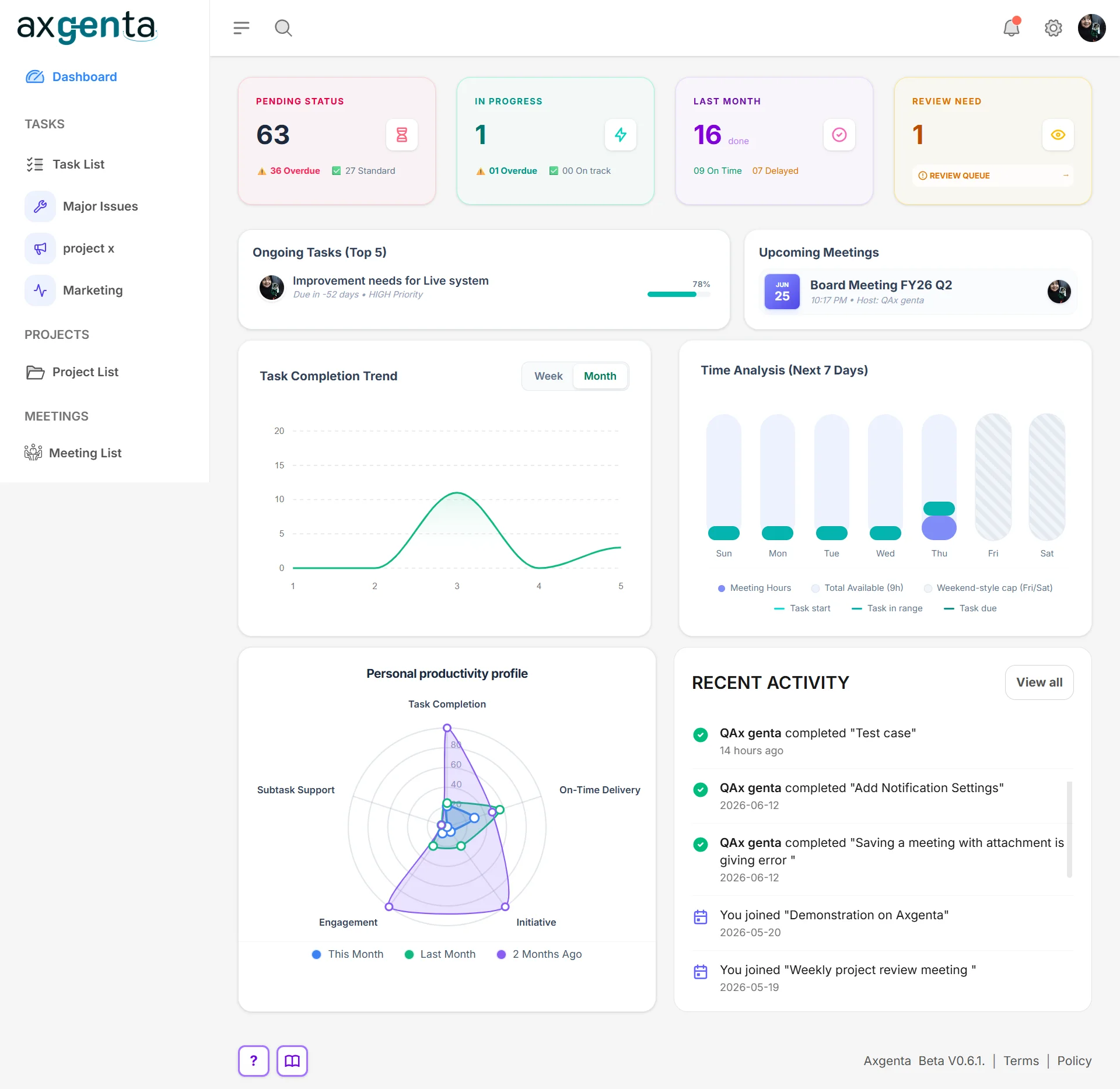
Stop managing tasks. Start mastering time. Reclaim your day with Axgenta.
Meetings aren't the problem.
What happens after them is.
The numbers are brutal, and they're not ours — they come from some of the most cited workplace studies of the last decade.
31 hrs
lost per employee, every month, in unproductive meetings
Atlassian workplace research
71%
of senior managers say meetings are unproductive and inefficient
Harvard Business Review, “Stop the Meeting Madness” (2017)
$541B
estimated yearly cost of poorly organized meetings across major economies
Doodle, The State of Meetings Report (2019)
68%
of employees say they don't get enough uninterrupted focus time
Microsoft Work Trend Index (2023)
Where the work actually leaks
Decisions evaporate
Action points live in someone's notebook, a chat thread, or nowhere at all. A week later, nobody agrees on who owns what — so the same meeting happens again.
Memory becomes the system
Your team's follow-through depends on people remembering things under pressure. Research on goal-setting shows the opposite works: written, shared commitments with progress check-ins dramatically raise completion rates.
— Dr. Gail Matthews, Dominican University of California goal-setting study
Nobody sees the slip until it's late
Without live progress visibility, deadlines fail silently. Managers find out at the next meeting — when the cost of the delay has already compounded.
Axgenta closes the gap between "we agreed" and "it's done" — by making every decision an owned, deadlined, visible task the moment it's made.
One meeting. Zero follow-up chaos.
Five steps, one decision. Here's the whole loop.
01 · Invitation
A meeting invitation arrives
Q3 Kickoff, Monday 9:00. The agenda is written before anyone walks in, so the room shows up prepared.
02 · Meeting minutes
Decisions are recorded where they happened
Each agenda item carries its decision and its action item — captured live, next to the discussion that produced it.
03 · Auto-tasks
Action items become owned tasks
Hit Complete and the work already exists: an owner, an assignee, a due date and a reviewer. Nobody retypes anything.
04 · Approval
The assignee asks; the owner approves
Progress isn't self-declared. That one extra step is the reason the project sitting at 100% is actually at 100%.
05 · Proof
One rating, two destinations
The reviewer scores the finished work once. It lands under the objective it belongs to, and in the person's own record.
Blueprint today. Deliver tomorrow.
See it the way your team will live it
Not features on a list — a normal work week, minus the chaos.
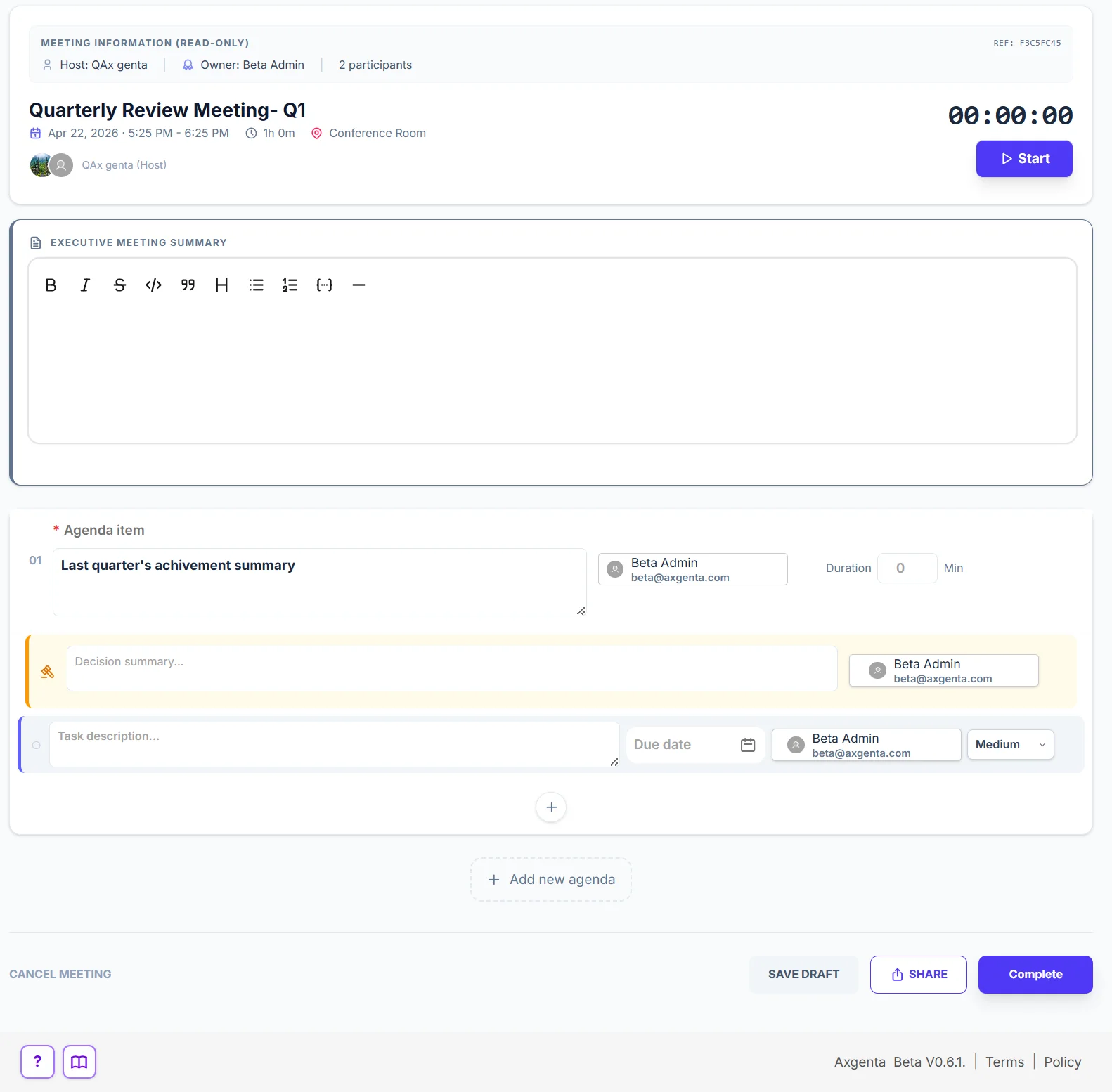
Monday · 9:00 AM — the weekly sync
Run the meeting. Capture the outcome. Live.
You know this meeting: decisions fly, someone "takes notes", and by lunch nobody remembers who owns what. In Axgenta, every agenda item carries its decision and its action task — with an owner, a due date, and a priority — assigned while everyone is still in the room.
- Agenda-first meetings with a live timer and executive summary
- Decisions recorded next to the discussion that produced them
- Action tasks assigned to real people before the meeting ends
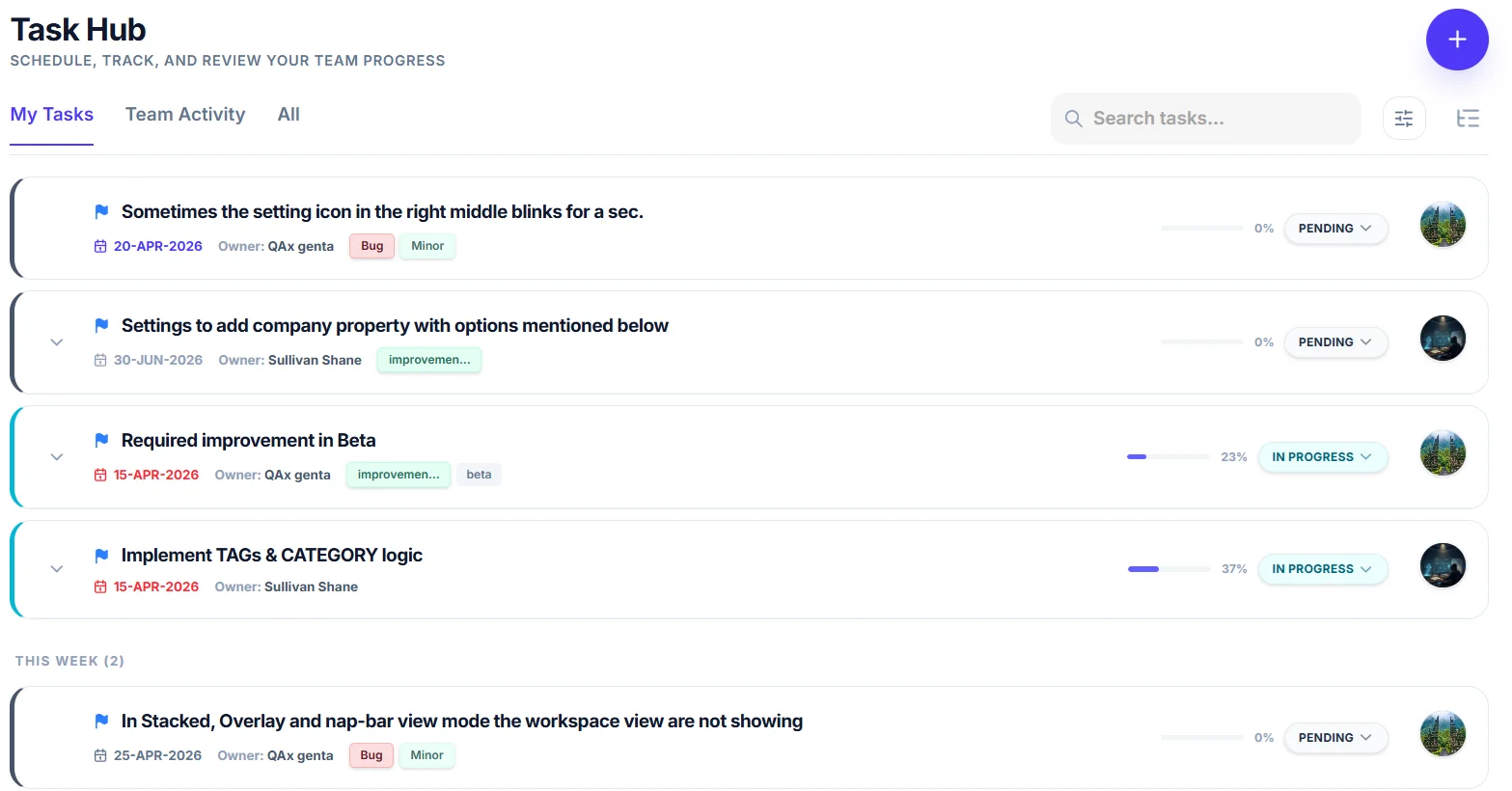
Monday · 9:47 AM — the meeting is over
The work already exists. No retyping, no chasing.
The moment you hit Complete, every action item lands in Task Hub as a tracked task — the same way a good assistant would have it ready on your desk. Owners see exactly what needs them next; you see exactly what's moving.
- My Tasks, Team Activity, and All views — everyone knows what's theirs
- Progress is requested and approved, never self-declared — so the number is real
- Automatic reminders before deadlines — not after they're missed
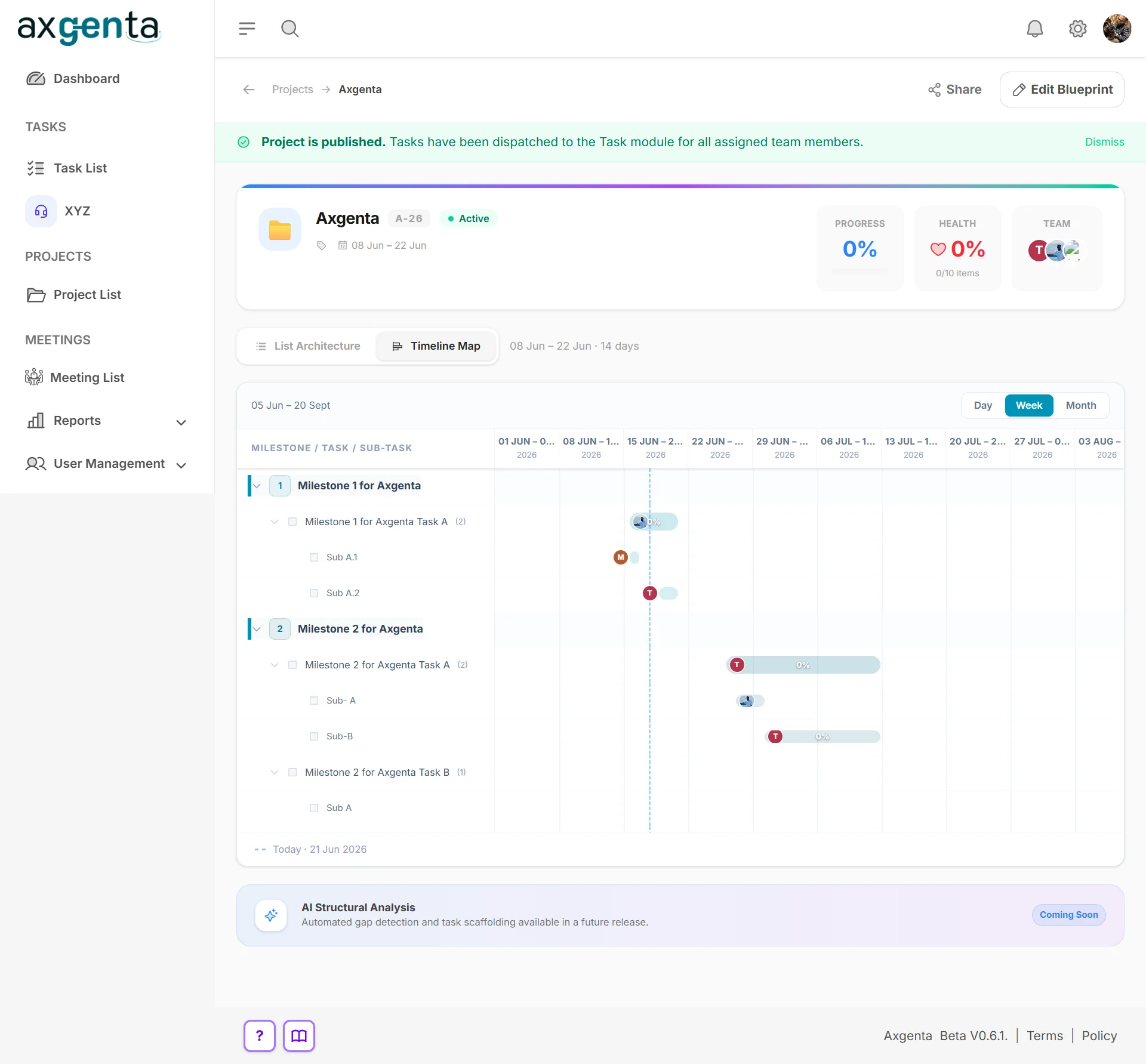
Tuesday — planning the quarter
Projects that keep the big picture honest.
Think of a house renovation: you don't just list chores, you sequence them — plumbing before paint. Axgenta's project blueprints work the same way: milestones, tasks, and sub-tasks on a timeline map, published straight to each person's task list.
- Milestone → task → sub-task structure with a drag-friendly Gantt timeline
- Publish once — work is dispatched to every assignee automatically
- Progress, health, and team load visible on one line
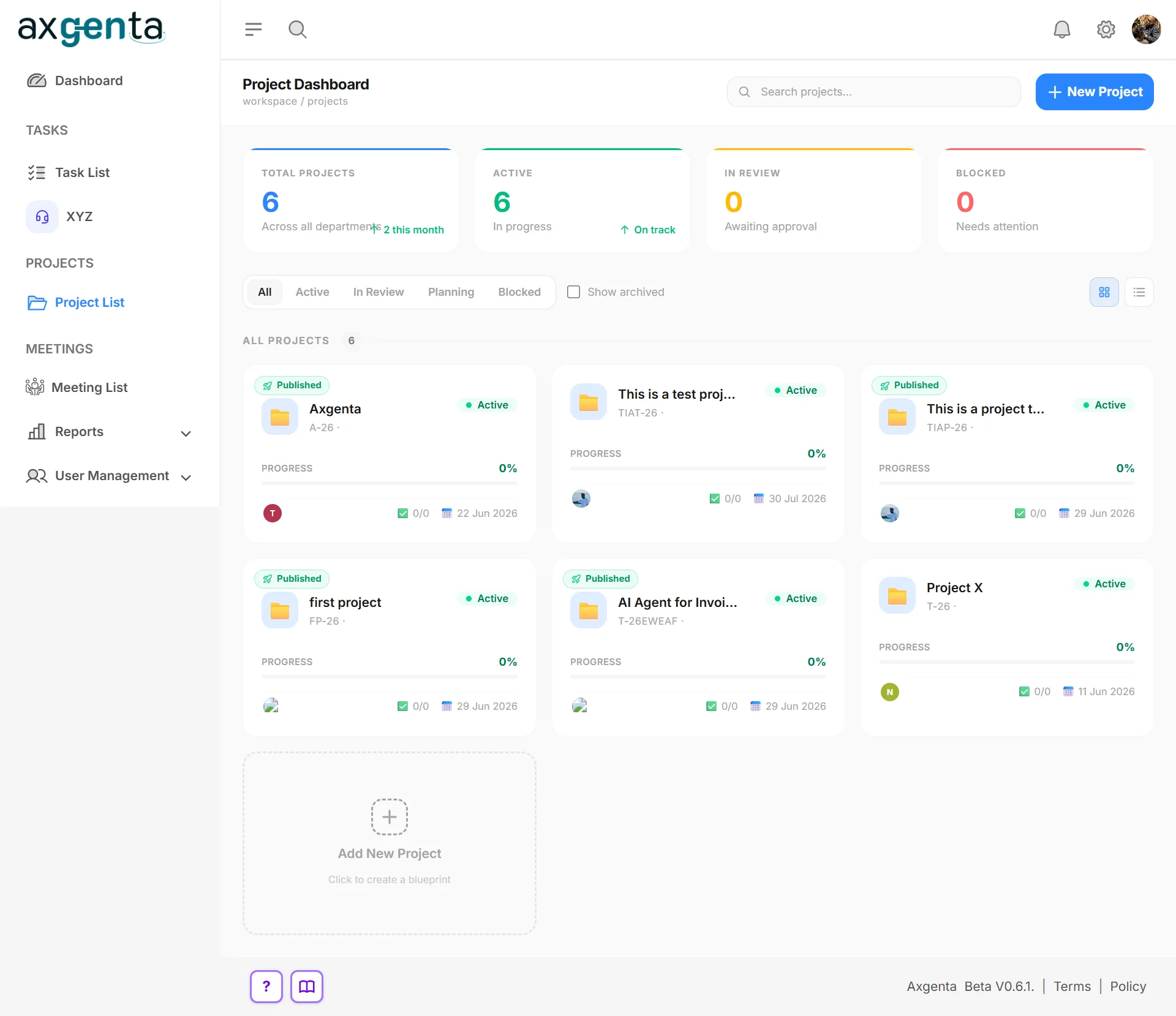
Wednesday — the leadership check-in
Every project's health, at a glance.
Instead of asking five people "where are we?", open the project board: active, in review, blocked — with progress and deadlines per project. It's the difference between driving with a dashboard and driving with your eyes closed.
- Portfolio view: total, active, in-review, and blocked projects
- Per-project progress, team avatars, and next deadline
- Filters and archives that keep the board clean as you scale
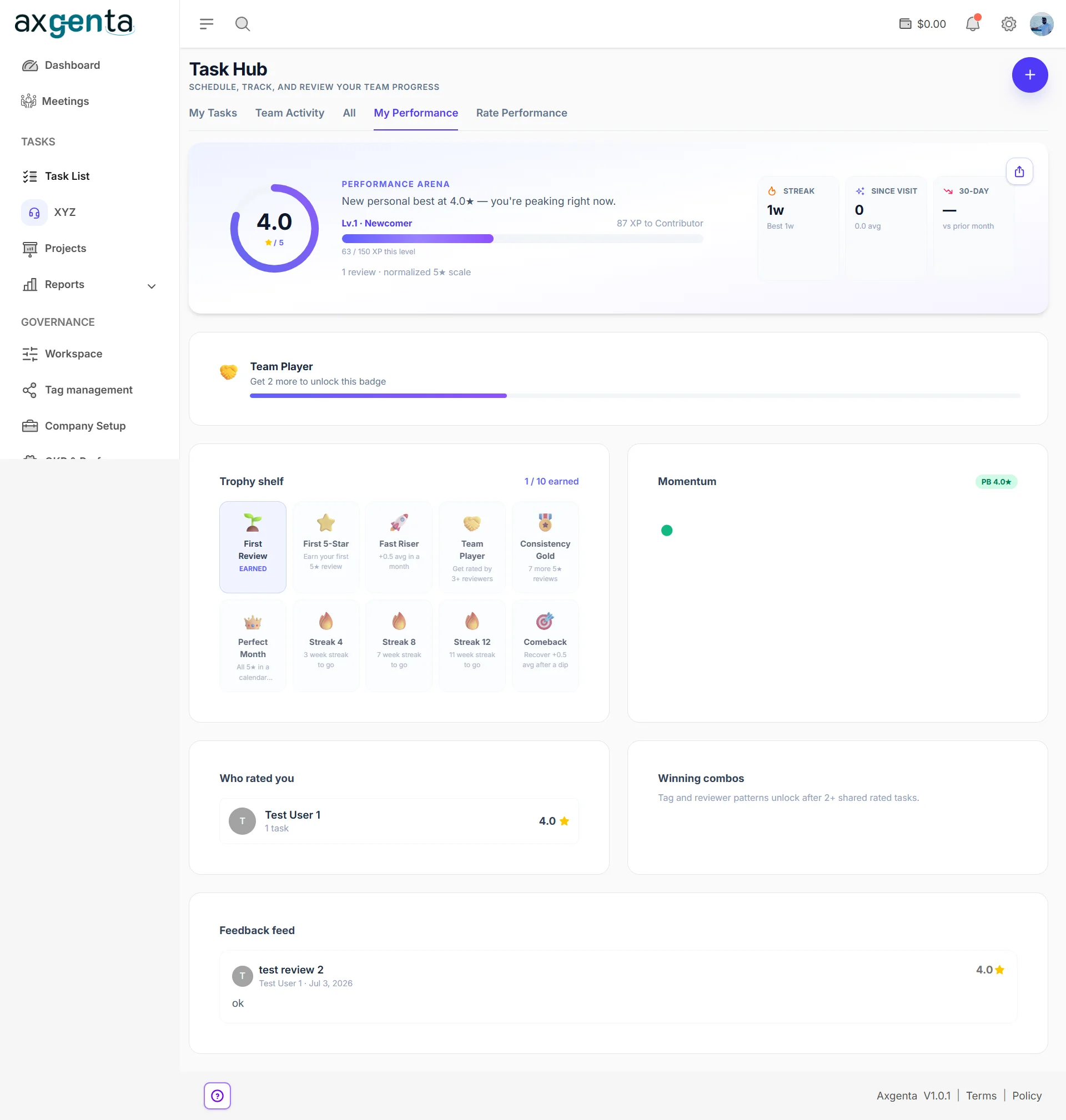
Friday — the part most tools forget
One review. Two jobs. Neither one manual.
People don't burn out from work — they burn out from invisible work. Every completed task carries a completion note, and the reviewer reads it and scores it once. That single score travels two ways: to the objective it belongs to, and to the person's own recognition record. Nobody types a report; the proof assembles itself.
- A published formula, with self-ratings excluded from your own score
- Missing data re-balances the weights — it is never scored as a zero
- Streaks, badges and a shareable card the employee owns and can take with them
Forty things closed this week.
Which one moved the company forward?
Ask that in most companies and the room goes quiet — because the OKR deck, the performance review and the task tool are three separate exercises built on three separate sets of evidence. Axgenta is the loop that connects them.
01
Set the goal
Strategy lives on one board everyone can see
Objectives carry weighted goals, and a goal links to a project — never to individual tasks. That link has to be approved by the goal's owner, so alignment is a deliberate act somebody is willing to defend.
- A project with an approved link becomes Strategic; everything else stays Operational and carries zero OKR weight
- Credit shares split contribution across the team, so a project isn't one person's trophy
- Because tasks can't be tagged straight to an objective, nobody can fake alignment by relabelling their chores
02
Do the work
Decisions become owned, approved, tracked work
This is the part you already scrolled through: meetings and project plans become tasks with an owner, an assignee, a date and a reviewer — and progress is requested and approved rather than self-declared.
- Meeting action items become real tasks the moment the meeting closes
- Project plans publish straight to each person's list, and changes sync back both ways
- Nobody marks their own work done — the split is enforced by the server
03
See the proof
One rating. Two destinations. Nobody typed a report
Finished work carries a completion note. The reviewer reads it and scores it once — and that single score travels in two directions at the same time, with weights set so nothing is double-counted.
- Upwards into the objective, as evidence that the goal actually moved
- Sideways into the person's own record — level, streak, badges, a card they own
- Quarterly, that becomes the input to next quarter's objectives, and the loop closes
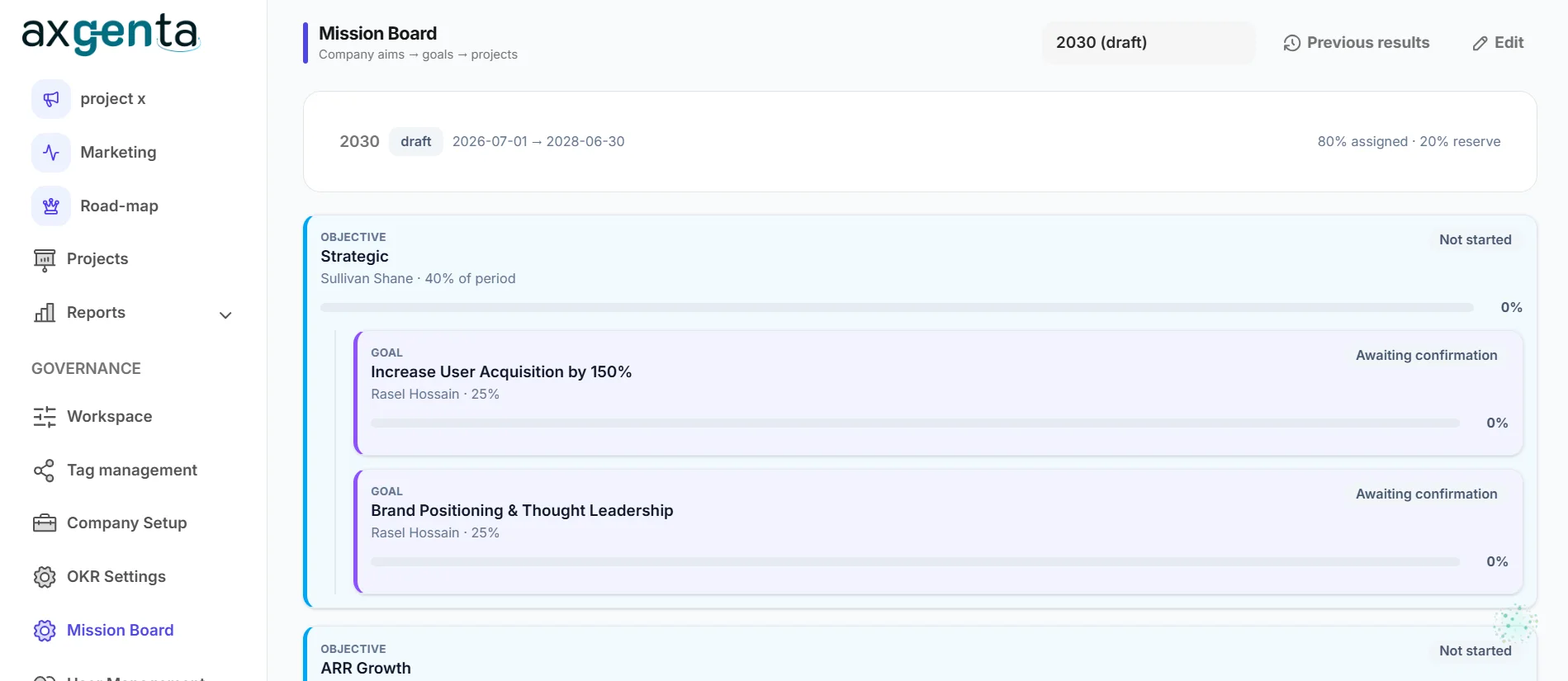
Beat 01 · The Mission Board
Company aims → goals → projects. In that order, and no other.
The board states its own hierarchy at the top of the screen, because the order is the product. Weight flows down it; nothing attaches sideways.
- Goals carry explicit weights, and the period shows how much is committed — here, 80% assigned with 20% deliberately held in reserve, so unused weight never penalises anyone
- “Awaiting confirmation” is the goal owner's approval gate: a project can't claim a goal on its own, which is what stops alignment theatre before it starts
- Every objective names one accountable owner and its share of the period — so “who owns this?” has an answer before the quarter begins, not after it
A goal can fail while every task succeeded.
The board will tell you that.
Chain ratings are human judgment, not a rollup of task stars — which is the one insight most OKR tools structurally cannot produce. Here is the published blend, printed because you are entitled to audit the number that describes your team.
Goal achievement
Rated by the objective's owner
Project success
Rated by the goal's owner
The work itself
Rated by the task's reviewer
Project outcome
Rated by the project's owner
A level nobody has rated yet is undefined, not zero. Its weight is dropped and the rest re-scale, so missing data never reads as failure — and self-issued ratings are excluded from the rater's own score.
“Performance scoring feels political”
Then read the settings screen. It's one page, in plain English.
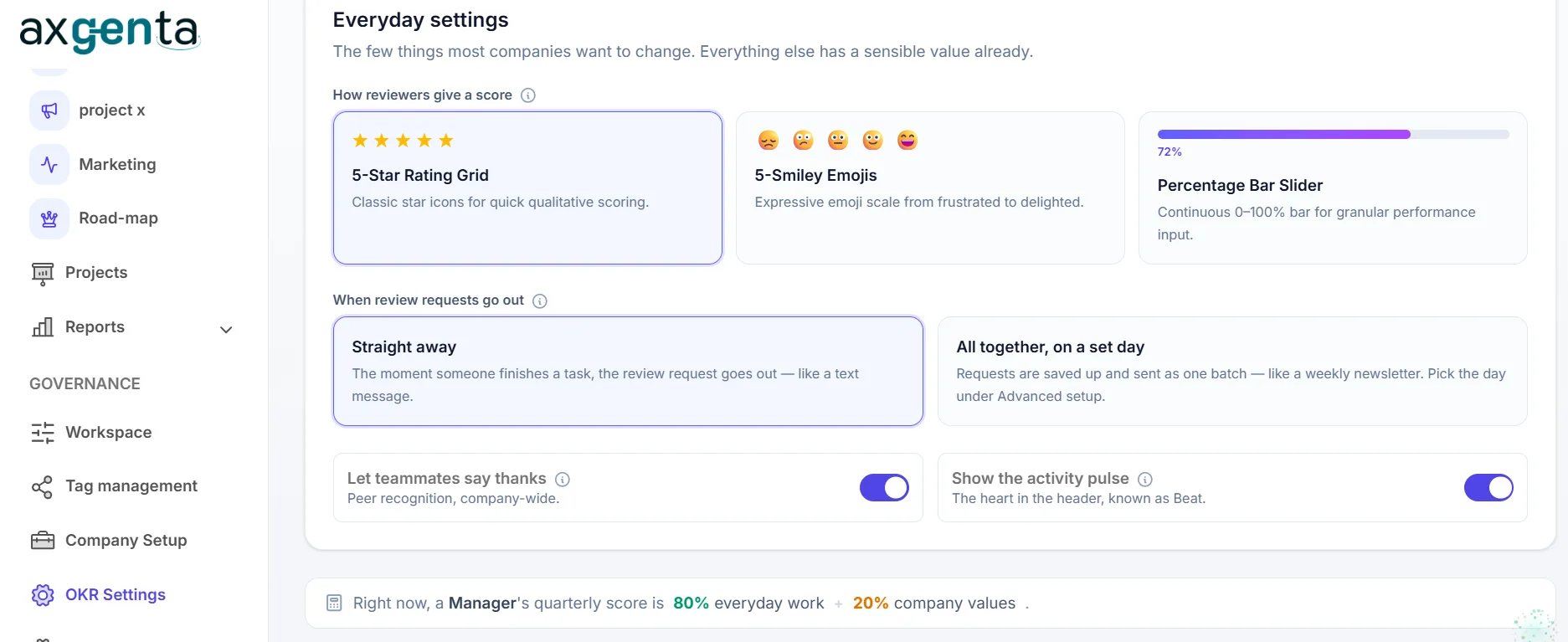
Scoring is only political when nobody can see how it works. Here the whole instrument fits on one screen — and it tells you, in a sentence, what it is currently doing:
Right now, a Manager's quarterly score is 80% everyday work + 20% company values.
Shown at the bottom of your own settings page
- Pick how reviewers score — five stars, five smileys, or a 0–100% slider. Different cultures rate differently, and forcing one scale on everyone is how you get meaningless data
- Send review requests the moment work finishes, or batch them onto one day a week, so approving isn't a constant interruption
- Peer recognition and the activity pulse are plain on/off switches — if they don't fit your company, turn them off and nothing else breaks
Six things your task tool structurally can't do
Not a longer feature list — a different shape. Each of these is a design decision a competitor would have to rebuild their product to copy.
Nobody marks their own work done
An assignee requests the status change; the owner approves it. That split is enforced by the server, not by team policy — which is the reason a number on this dashboard is worth acting on.
The reason the dashboard is trustworthy
Decisions become owned work, live
Every agenda item carries its decision and its action item. Assign an owner, a date and a reviewer before the room empties, and the task exists the moment the meeting ends — no retyping, no chasing.
One review, two jobs
The reviewer rates finished work once. That single score feeds the objective it belongs to and the person's recognition record — with weights set so nothing is counted twice. Nobody assembles either one by hand.
Every score climbs back to the goal
Objectives link to projects, not to individual tasks, so alignment can't be faked by tagging. And because ratings are judgment rather than a rollup, a goal can fail while every task succeeded — and the Mission Board will show you exactly that.
The answer to "which one moved us forward?"
Contractors without a guest seat
Invite an external assignee by email. They work an isolated copy; status, progress and completion sync back; your internal notes, attachments and reviewers never cross the boundary.
Documentation as a by-product
Notes, comments and history are three separate channels — what I learned, what we agreed, what happened. Because writing them is the job rather than a job, the record is still accurate the week someone leaves.
Yes, it asks your managers to manage. That's the point.
Our Philosophy
In the world of productivity software, everyone is chasing the "Apple Standard" — cold glass, white rooms, and sterile perfection. But at Axgenta, we believe that work isn't a laboratory; it's a living, breathing experience.
"Built with logic. Driven by a heartbeat."
We'll be the first to say it: we don't strive for the kind of perfection that feels untouchable. Robots are perfect, but robots don't know the pressure of a deadline or the thrill of a team breakthrough.
Instead, we strive for Functional Harmony. We built Axgenta to be near-perfect in its logic, but deeply human in its soul.
Still thinking it over?
Evaluating us on security? Read how tenant isolation actually works →
Two ways to get your time back
Try it yourself in minutes, or let us walk your team through it live.
Start free, right now
Full access for 15 days, up to 5 seats. Run your next meeting in Axgenta and watch the action items assign themselves. No credit card, no sales call.
Create your workspaceAverage setup time: under 10 minutes
Book a live demo
Tell us how your team runs syncs today — we'll show you the after.
Pick an available time slot that works for you. We'll walk your team through meetings, tasks, projects, and performance — live. No slides, just the real product.
- See your workflow in action — not a generic pitch
- Ask anything, get answers on the spot
- 30 minutes — enough to know if it fits
No pressure · No credit card · Just a conversation